
One workday. Several records that need to agree.
An employee clocks in, takes a break and finishes a shift. A manager approves leave. HR changes a work location, drafts an appointment letter and prepares the monthly salary review. Each action looks small on its own. Together, these records explain who worked, what they earned and which documents the company issued. An HR system earns trust when those explanations agree across screens.
The goal is not simply to collect more information. It is to keep each fact attached to the right person, date and decision. A dashboard should lead to the underlying record. A correction should appear in the next review. An issued document should preserve the wording that was actually approved. Here is a practical way to build that connected workflow, whether you are organising a growing startup or running a shift-based team.
1. Begin with a stable employee identity.
A person’s name is useful to a colleague; it is not enough to connect payroll, attendance and access. Two people can share a name, and someone can change their name during employment. Use an employee identifier and a clearly linked login to carry their records across the workspace. Check the company, role, reporting line and employment dates before relying on a new profile.
When someone leaves, retaining employment history and removing access are separate responsibilities. The responsible administrator should complete the exit checklist and confirm that access has ended. Give a future hire their own identity rather than reusing a former colleague’s account. A clean identity boundary protects historical records and makes later questions—whose attendance, which salary and which letter—much easier to answer.
2. Give a shift one clear work date.
A night shift can begin on Tuesday and end on Wednesday. If every screen groups events only by the clock’s calendar date, the same work can appear as an absence on one day and extra attendance on another. The roster, punch history and attendance review need a shared understanding of the shift’s work date, including breaks and an overnight finish.
Before closing a period, inspect exceptions rather than only the headline attendance percentage. Look for a missed final punch, an unexpected roster assignment or a correction that was recorded against the wrong day. Keep a reason when HR removes or corrects a punch. The aim is a clear account of the workday, supported by visible evidence, rather than a dashboard that merely looks complete.
3. Resolve leave before it becomes a deduction.
An approved day off should not quietly become an unpaid absence. Attendance needs to consider the roster, holidays, company week-off settings, approved leave and recorded day corrections together. “Not present” does not automatically mean “unpaid.” Equally, a pending leave request is not the same as an approved one. The approval decision and its paid or unpaid treatment matter.
Review the dates and approval state before calculating loss of pay. If a manager’s approval arrives late, check which salary review it affects. Changing an approved leave record can also change the balance used by that employee, so the correction should preserve the previous decision and the reason for the amendment. In Karya, attendance and payroll review should be read as parts of one workflow, not as competing totals.
4. Let uploads help people, with a review before use.
A document import can save a great deal of retyping, especially when a company already has a preferred letter format. Word and PDF inputs can provide wording and structure; OCR can make a scanned PDF readable. Extraction still needs a human review. A scan may contain a faint number, a table split across pages or a footer that should not become part of the next paragraph.
Check the complete extracted document, including later pages, before turning it into a reusable template. Confirm names, dates, salary figures and any sensitive identifiers. Then apply company branding and preview the result. Keep the original source available where the workflow supports it. Good automation gives HR a useful starting point and makes uncertainties visible; it should not silently present an uncertain scan as a finished employment document.
5. Treat payroll as a sequence of reviewed decisions.
Generating a salary calculation, issuing a payslip and confirming payment answer different questions. The calculation asks what the records support. Issuance preserves the reviewed figures. Payment evidence records what the bank actually completed. Keeping these stages explicit helps a team catch missing salaries, incorrect loss of pay or an incomplete bank destination before they affect employees.
Start with the applicable company salary structure and review the attendance basis for the selected month. Examine earnings, employee deductions, employer contributions and payable days separately. A percentage of gross is not interchangeable with a percentage of a defined contribution wage base. For supported standard domestic PF/ECR preparation, use the dated working-file review and resolve its checks. A company’s editable salary settings are not, by themselves, proof of statutory eligibility or filing readiness.
6. Preserve the difference between a correction and a receipt.
Suppose an attendance correction changes an issued salary entitlement after the original review. The revised entitlement should remain connected to the original copy and the reason for the change. A confirmed payment does not disappear merely because the salary was recalculated. If the revised entitlement is higher, the outstanding difference may need payment. If it is lower, a recovery requires its own review and evidence.
That is why historical “Paid” status should not be used to invent an amount, date or bank reference that was never recorded. Review actual receipts and keep them separate from the corrected entitlement. Karya’s supported non-PF correction workflow preserves original salary history and records reviewed differences separately. Issued PF monetary changes require a separate statutory reconciliation; the generic attendance revision route does not rewrite them or amend an external return.
7. Make a document useful beyond the moment it is drafted.
An offer letter is more useful when its salary schedule agrees with the reviewed payroll structure. An appointment letter needs the correct employee, role, location and joining details. An experience letter should reflect recorded employment dates. These connections reduce repetitive entry, but they also make a preview essential: the company remains responsible for the wording it issues.
Build a reusable starting library, then adapt it to the company and the specific situation. Use sections, a readable hierarchy and consistent branding rather than a wall of text. Once a document is issued, later salary or template edits should not rewrite that issued copy. Keep drafts visibly separate from issued documents, and make the retained document easy to find in the relevant employee record.
8. Ask questions that lead back to the evidence.
“Who needs attention today?” is a useful starting question, but a good answer needs context. Is the concern a missed punch, an approval waiting for a manager, a salary structure that has not been set or a document still in draft? Plain-language suggestions can help a person reach the right question without memorising the software’s internal vocabulary.
Karya’s Maharishi record assistance is most useful when it connects a supported answer to the source screen or record the user is allowed to see. Treat a summary as a guide to the evidence. Check the person, date range and approval state before acting on an answer. No assistant should imply it can see an inaccessible company’s records or that a fluent response replaces an authoritative payroll or employment decision.
9. Make the overview a place to decide what happens next.
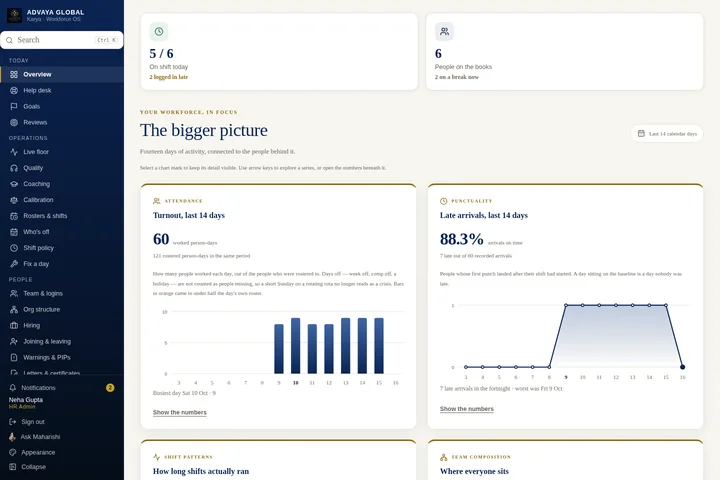
A colourful chart is useful when it answers a question and opens the detail behind it. Headcount can lead to the employee directory. An attendance breakdown can reveal a shift or team that needs review. A payroll readiness card can point to missing salary or bank information. The next action should be close to the number that prompted it.
Prefer a few clear decisions over a crowded collection of totals. Keep company workspaces easy to reach for HR administrators, while preserving employees’ personal attendance, leave and payslip access. Choose an appearance that keeps labels and chart values readable in both light and dark modes. Attractive presentation and reliable information support each other: a dashboard should be pleasant to use and clear about what its numbers mean.
A practical monthly check for your team.
Before closing the month, confirm employee identities and employment dates, resolve attendance exceptions, complete leave decisions and review the salary structure for the period. Generate the calculation, inspect the breakdown and finalize only the reviewed figures. Record confirmed receipts separately. If a source changes, return to the affected review and regenerate any stale financial output rather than relying on yesterday’s download.
Keep statutory preparation, submission and payment distinct. A validated working file helps prepare an external filing; it does not mean a return was submitted or a bank transfer succeeded. Start with one employee and one workday, follow their records through the workflow and check that each handoff is understandable. That habit is a stronger foundation for connected HR than any promise that software can remove the need for review.
This guide explains reviewed HR workflows. It does not replace legal, payroll or tax advice. Feature access depends on plan, role and company configuration. Filing and bank payment remain external actions.